Marking deals won or lost
How the terminal flag on stages drives Closed Won revenue, the open pipeline metric, and conversion math.
A pipeline isn't useful until you can answer "how much money did we close?" and "how much is still in flight?" — both of those rely on knowing which stages mean done. Corto handles this through the terminal flag on each pipeline stage.
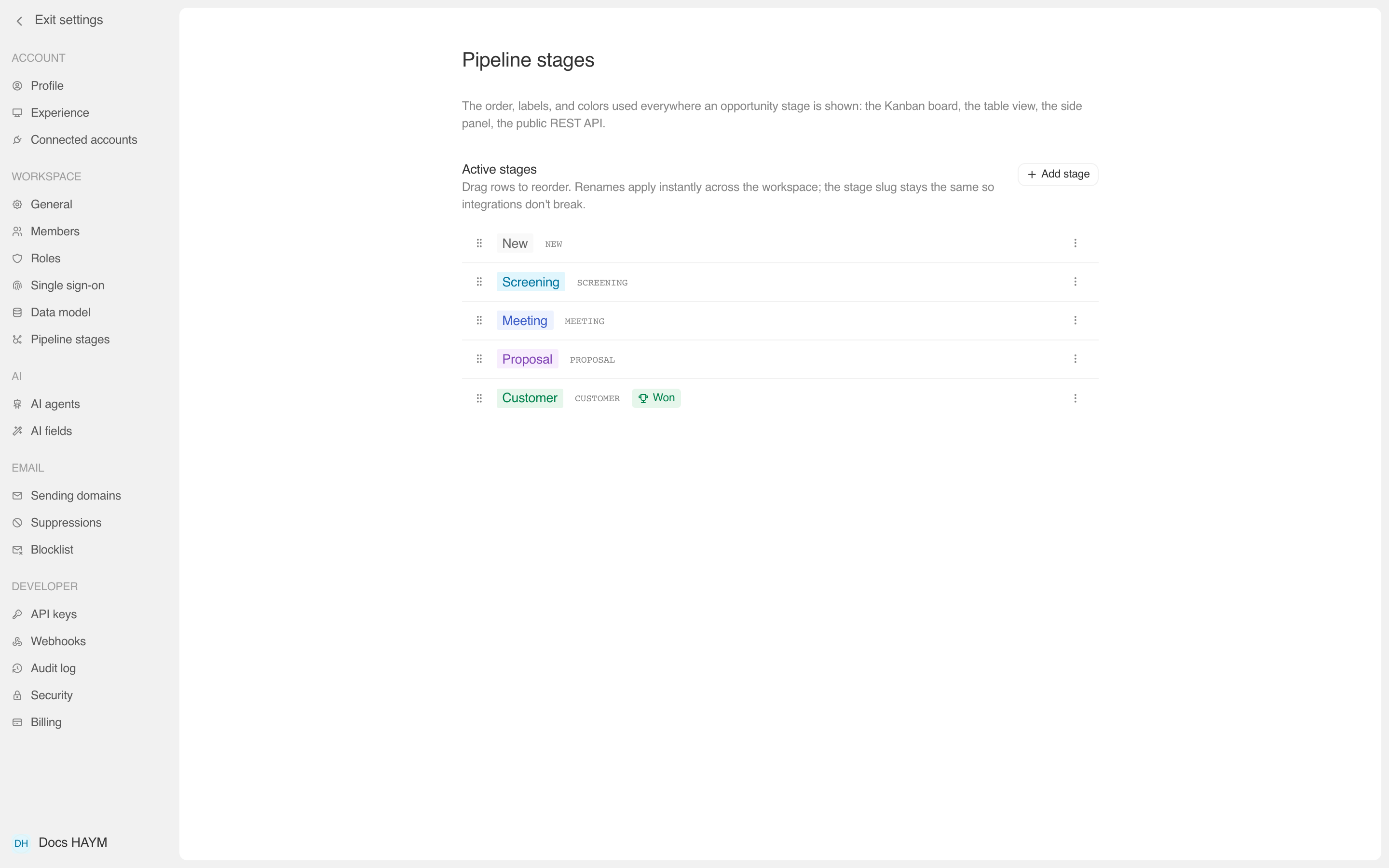
The three terminal states
Every stage in your pipeline carries one of three terminal values:
| Value | What it means | Where it lands on the dashboard |
|---|---|---|
won | Closed and the customer signed. | Counts into the Closed Won revenue total. |
lost | Closed but didn't win. | Excluded from the Open pipeline total. Not counted toward Closed Won either. |
| Unset (default) | Mid-pipeline — the deal is in flight. | Counts into the Open pipeline total. |
In the default seed, only Customer is marked won. There are no
lost stages by default — you add them when you want loss reporting.
Setting the flag
Open Settings → Pipeline stages.
Find the stage row you want to flag.
Click the ⋯ menu on the right.
Pick "Mark as Won" or "Mark as Lost".
The pill in the row picks up a small badge ("Won" / "Lost") so you can see the state at a glance from the editor.
To unset, open the ⋯ menu again and pick Unmark as Won / Unmark as Lost.
How the math works
The dashboard's pipeline summary groups every Opportunity by its stage's terminal value:
pipelineMicros = Σ amountMicros where stage.terminal IS NULL
                                   OR stage.terminal NOT IN ('won','lost')
wonMicros      = Σ amountMicros where stage.terminal = 'won'
lostMicros     = (informational — not surfaced in the default widget)
So if you have:
- 3 deals in New ($10k each),
terminal: null - 2 deals in Proposal ($30k each),
terminal: null - 4 deals in Customer ($25k each),
terminal: won - 1 deal in Closed Lost ($15k),
terminal: lost
Then:
- Open pipeline = $30k + $60k = $90k
- Closed Won = $100k
- The Closed Lost $15k is excluded from both totals.
Multiple Won / Lost stages
Sometimes one terminal stage isn't enough. Common splits:
- Won — New vs Won — Expansion — so you can see new-logo revenue separately from upsells.
- Lost — No budget vs Lost — Wrong fit vs Lost — Lost to competitor — so loss reasons are baked into the pipeline shape instead of needing a separate field.
You can mark all three Lost variants as terminal: lost — the math
still works. Each one excludes its deals from Open pipeline.
Why this matters more than "just a flag"
Most CRMs hardcode "Customer" or "Closed Won" as the single special
stage, which means renaming or splitting it breaks every report.
Corto's approach — letting any number of stages carry the won or
lost flag — means you can shape the pipeline to match how your team
actually thinks about deal outcomes, without breaking the dashboard.
This is also forward-compatible with stage-level reports we're adding
next: Time in stage (how long deals sit in each non-terminal stage
on average) and Stage changed (transitions per period). Both will
treat any won / lost stage as a valid endpoint without you having
to configure anything.