Opening the side panel
The right-hand record peek — opening, closing, navigating between rows, deep-linking.
The side panel is the quick-look surface for any record. It opens on the right of any list view, takes ~480px of horizontal space, and lets you read or edit a record without leaving the list you came from.
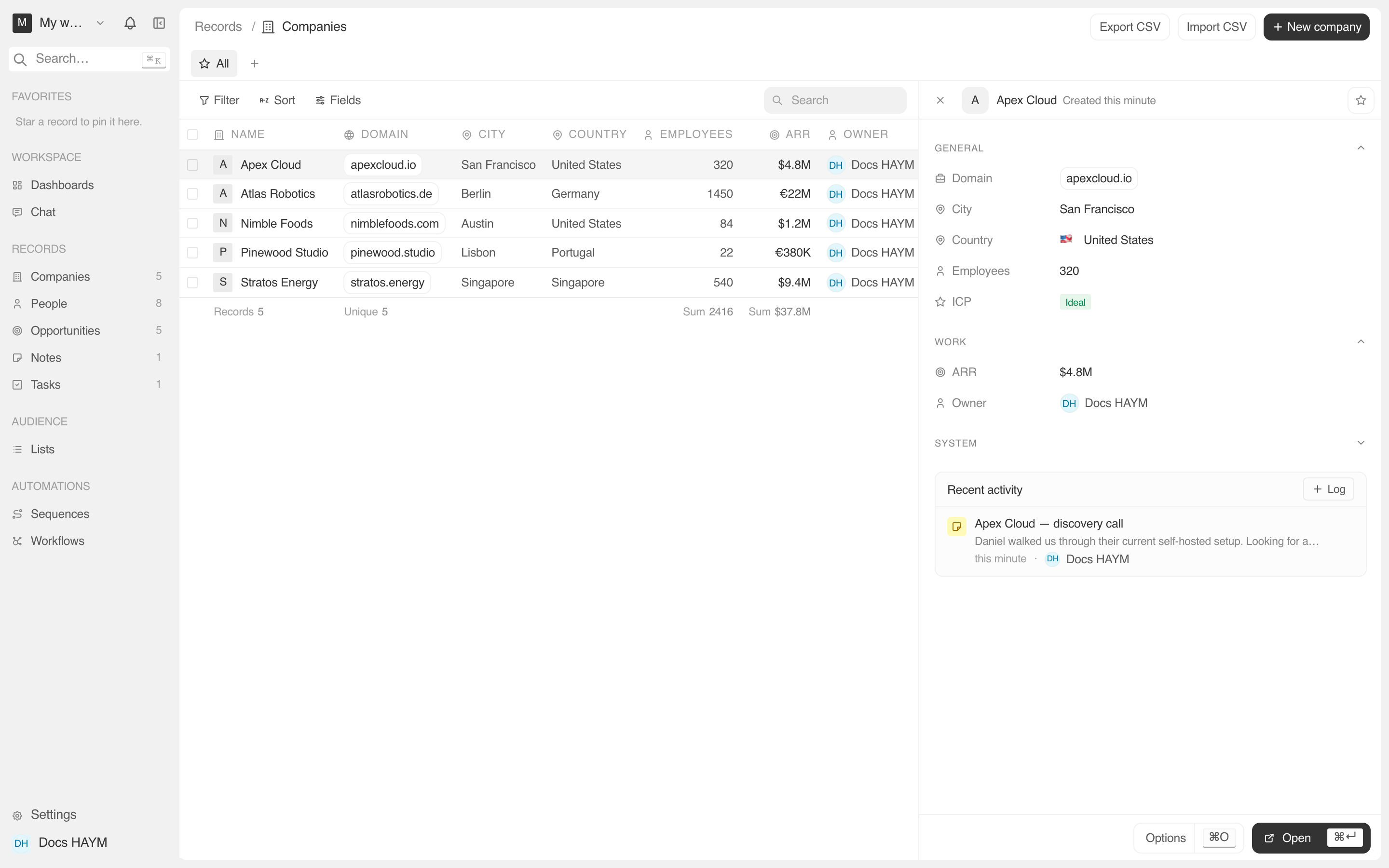
Opening the panel
Click a row in any list (Companies, People, Opportunities, Notes, Tasks).
The row highlights and the panel slides in from the right.
Or click a Person / Company / Opportunity link from inside another record's side panel or detail page.
This is the natural way to "follow a relation" — clicking the Company field on a Person panel opens the company without leaving the People list underneath.
Or open a shared link that includes a record id.
URLs look like /objects/companies?selectedId=abc-123. The list
auto-scrolls to the row and the panel opens to match. Useful when a
teammate pastes a link in Slack.
Closing the panel
| To close | Do this |
|---|---|
| With the close button | Click the × in the top-right corner of the panel |
| By clicking again | Click the same row in the list |
| With the keyboard | Press Esc |
| By navigating away | Go to a different page from the sidebar |
The selected-row id lives in the URL's selectedId query parameter,
so forward / back works the way you'd expect: the browser Back
button deselects, Forward re-selects.
Layout
Top to bottom, every panel has the same shape:
| Slot | What it shows |
|---|---|
| Header | Avatar / initial, record name, "created N ago" timestamp, Favorite star, action menu. |
| Sections | Collapsible groups of fields. Click the chevron next to a section title to collapse. |
| Recent activity | The merged feed of notes / tasks / calls / messages / events / stage changes. See Recent activity card. |
| Footer | ⌘O Options and ⌘↩ Open (navigates to the full record page). |
Keyboard shortcuts inside the panel
| Key | Action |
|---|---|
| Esc | Close the panel. |
| ⌘↩ / ⌃↩ | Open the full record page (same as clicking the name). |
| ⌘O | Open the actions menu (edit, delete, copy link). |
| Tab | Move focus through the editable fields, top to bottom. |
The panel is scoped to the route. Navigating from /objects/companies
to /objects/people automatically deselects — the panel doesn't
accidentally try to render a company id as a person. This makes
deep-links safer.
On a Note or Task panel
Notes and Tasks are the leaves of the activity graph — they are activity, they don't have activity. So the Recent activity card is hidden on Note and Task side panels. If you click a note from a company's feed, the note's panel just shows the note's content.