The Recent activity card
What every row in the side-panel feed means, and how the card decides what to surface.
The Recent activity card lives on every Company, Person, and Opportunity side panel. It's the answer to "what's happened to this record lately?" — five rows, newest first, with a one-click jump to the underlying note / task / message / call.
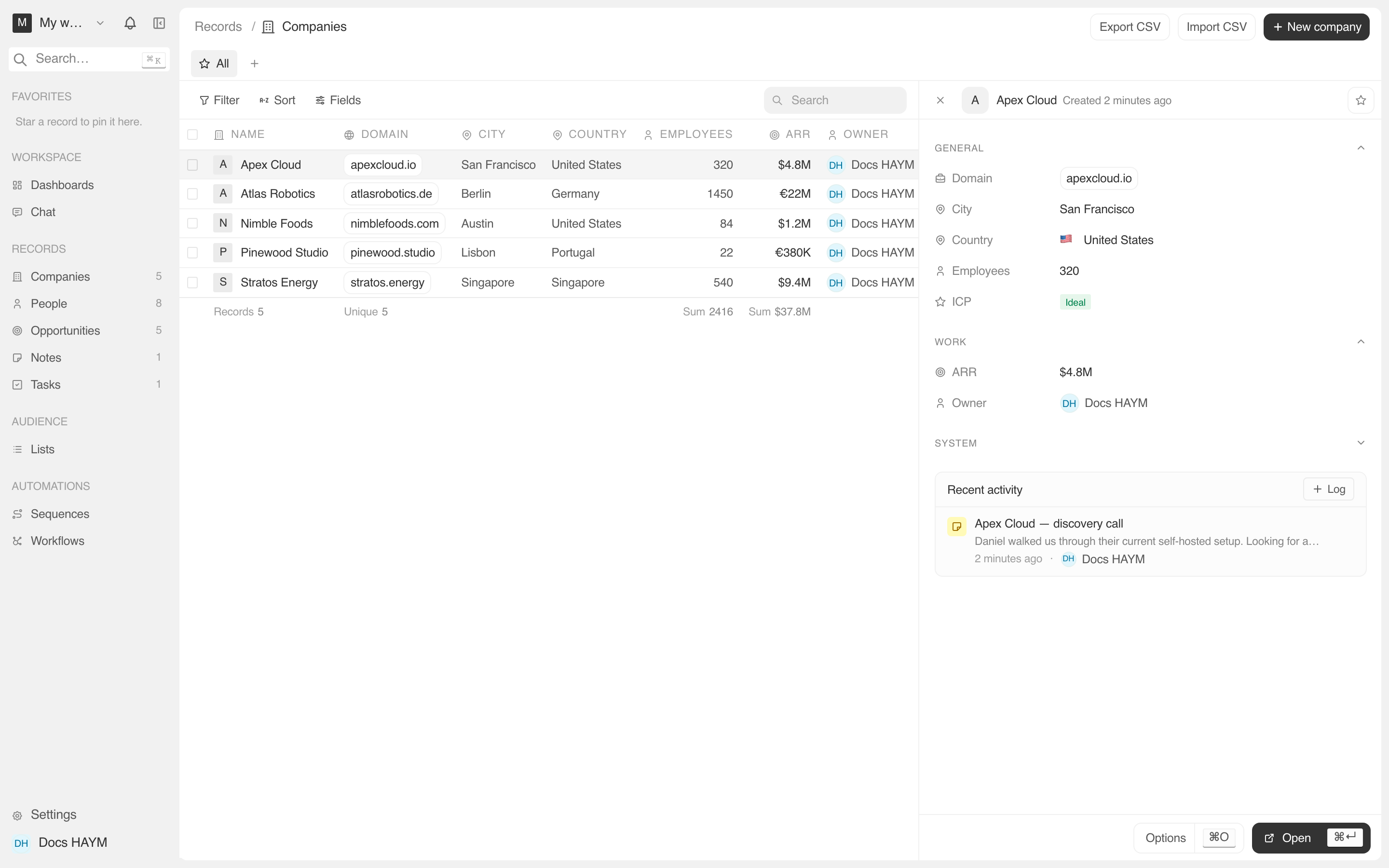
Anatomy of a row
Every row, regardless of source, follows the same layout:
┌────────────────────────────────────────────────────────────┐
│  [icon]   [summary line]            [→ stage chip if any]  │
│           [optional body preview]                          │
│           [relative time]  ·  [author chip]                │
└────────────────────────────────────────────────────────────┘| Slot | What it shows |
|---|---|
| Icon swatch (top-left) | Color-toned per kind. Lets you scan the feed for "just the calls" or "just the notes" without reading. |
| Summary | One line. The note's title, the task's title, the call's summary, or the activity event's pre-rendered text ("Moved Acme to Proposal"). |
| Body preview | Optional. Notes preview the first ~240 chars of their body. Calls preview their notes field. Tasks and messages don't have a body preview. |
| Stage chip (top-right) | Only on stage-change rows. Renders two StagePills with an arrow between them ("Discovery → Proposal"). |
| Relative time | "Just now", "2h ago", "yesterday", "Jun 14". |
| Author chip | The team member who logged it. Missing for system events and inbound messages. |
What each kind looks like
The icon tone tells you the kind:
| Kind | Tone | When it appears |
|---|---|---|
| Note | Yellow | Anyone created or edited a note attached to this record |
| Task | Blue | A task was attached to this record |
| Call | Orange | A call was logged against this record via + Log → Call |
| Message | Green | A Gmail thread was synced where this record is a participant (Person / Company only) |
| Event | Purple | A Google Calendar event was synced where this record attended (Person / Company only) |
| Stage change | Gray | An Opportunity's stage field was updated. Always carries a stage chip. |
| Field edit / other activity | Gray | Anything else captured in activity_event — creation, deletion, field edits. |
How the feed is built
A single backend call merges six sources for the record:
activity_event — any kind, including stage changes (those come with a stageChange: { from, to } payload).noteTarget.taskTarget.callLogTarget.messageParticipant (People / Companies only).calendarEventAttendee (People / Companies only).Sources are merged, sorted by occurredAt newest first (lexicographic id as tiebreak for sub-second ties), and the top 5 are returned.
The merge also dedupes against the activity_event row that the call endpoint emits — so when you log a call, the "Logged call: …" activity row is suppressed in favor of the richer call_log entry, and the same touchpoint doesn't show twice.
Clickable rows
| Kind | Click target |
|---|---|
| Note | Navigates to the note's detail page (/object/note/:id). |
| Task | Navigates to the task's detail page. |
| Call | No-op for now — we don't yet have a dedicated call detail page. The body preview surfaces the call notes. |
| Message | No-op — Gmail threads are surfaced separately in the Messages card. |
| Event | No-op — calendar events are surfaced separately in the Events card. |
| Stage change / activity | No-op — the activity_event row has no detail page. |
The cursor doesn't switch to a "click me" pointer on non-clickable rows to avoid the dead-affordance feel.
What's deliberately not in this card
Pagination. The card only ever shows 5. Anything older lives in the detail page's full timeline tab. We pick 5 because more than that pushes the editable field rows off the bottom of the panel.
Empty notes / draft messages. A note has to have a title; a draft message doesn't qualify as a touchpoint until it's sent.
Record-viewed / enrichment-ran events. System noise. They live in the audit log if you really need them, but never make it to this card.
When the card is empty
A brand-new record (just created, no notes / tasks / messages yet) shows:
Sparkles icon
No activity yet. Log a note, task, or call above to seed the timeline.
The "above" is the + Log button in the card's title row — see Logging a note, task, or call.
On a Note or Task panel
Notes and Tasks are the leaves of the activity graph — they ARE activity, they don't HAVE activity. So the Recent activity card is hidden on Note and Task side panels. If you click a note from a company's feed, the note's panel just shows the note's content.
Tips
The card is 30-second staleTime. Open it, log a note, the card re-fetches within 30 seconds and shows the new row. Manual refresh isn't needed.
Cross-record auto-surface. A note you write on a Person also shows up on that person's Company recent activity feed (since notes can target multiple records). The body preview helps you tell at a glance whether you wrote it from the person or company context.
The stage chip uses your live config. If you renamed PROPOSAL to "Negotiation" in Settings, the stage-change row's chip shows "Negotiation". The historical row's summary is unchanged — it still reads "Moved Acme to Proposal" because that's what was true at the time.