Logging a note, task, or call
The three drawer flows behind the "+ Log" button on every record's Recent activity card.
The + Log button in the Recent activity card's title row drops a menu with three options. Each one opens a focused drawer pre-attached to the record you're looking at, so the touchpoint lands in the right place without you wiring it up by hand.
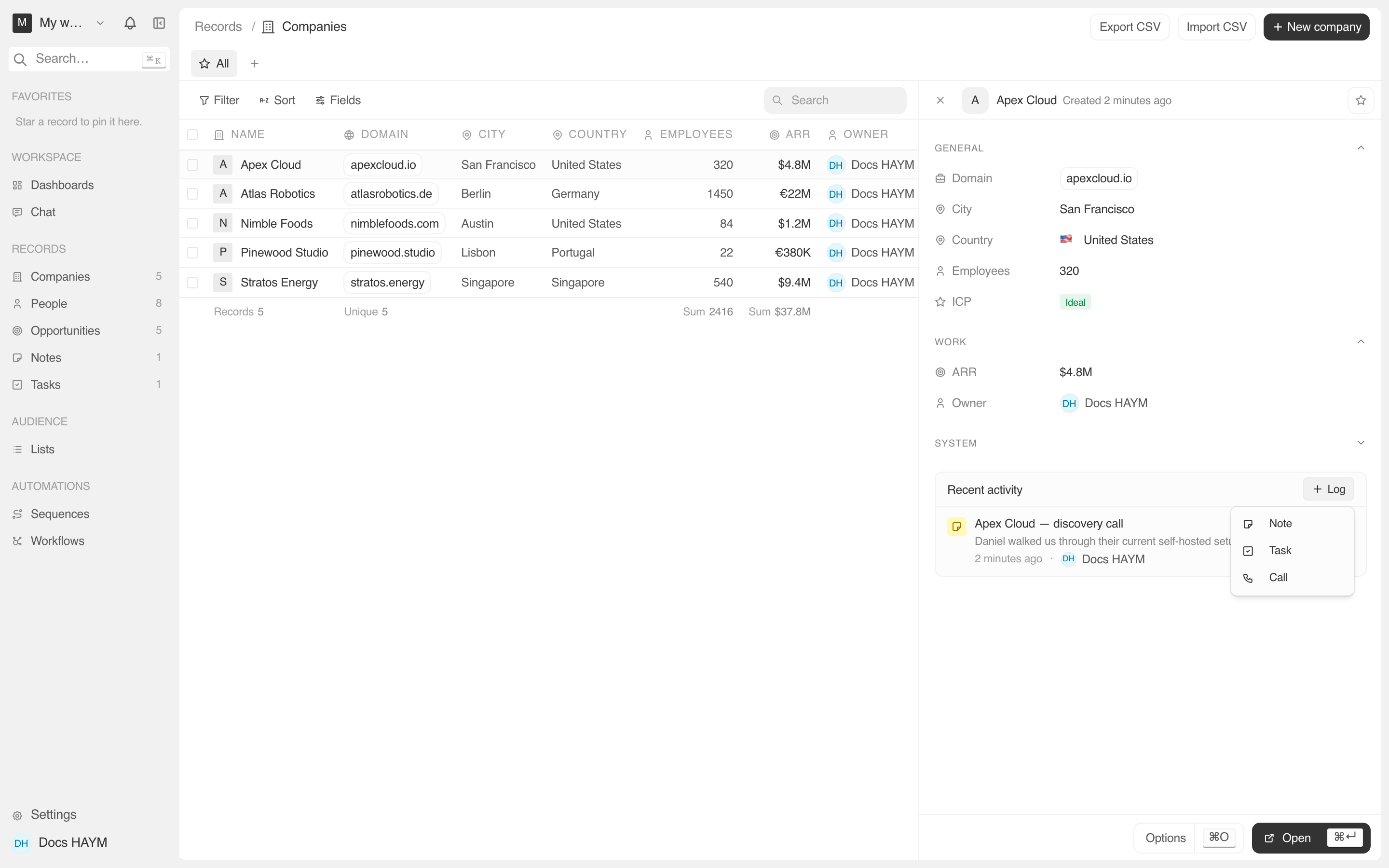
The flow is always:
All three drawers commit on Create / Log call / Create task, then auto-close. The Recent activity card invalidates its query and the new row appears within a couple seconds.
Note
The simplest of the three. One required field, plus a rich-text body.
| Field | Required | Notes |
|---|---|---|
| Title | yes | One-line label. Appears as the row summary. |
| Body | no | BlockNote rich-text editor. Supports headings, lists, code blocks, paste-as-markdown. Lazy-loaded — first open of the drawer in a session pays ~250 KB. |
The note is created and auto-attached to the current record. It also
gets its own detail page (/object/note/:id).
Targeting multiple records from one note
If you opened the drawer from a Company side panel but want the note to also attach to a specific Opportunity, the simpler path is:
Multi-target attaching from inside the drawer isn't in v1 — we'll add it when the first customer asks.
Task
A task is a note with three extra fields: status, due date, and assignee.
| Field | Required | Notes |
|---|---|---|
| Title | yes | One-line label. Appears as the row summary. |
| Status | no | Defaults to To do. Other options: In progress, Done. |
| Due date | no | A YYYY-MM-DD picker. We store as UTC date with no time. |
| Assignee | no | Workspace member. Defaults to the current user. |
| Body | no | Same BlockNote editor as Note. Optional. |
Tasks differ from notes in two important ways:
- They show up on the /today page if assigned to you and due today or earlier. The activity card gives you the muscle memory; /today gives you the morning standup.
- The status pill is checkbox-toggleable from the Recent activity row — no need to open the task to mark it done.
Call
The Log call drawer is for capturing a phone call you just got off, without going through a CTI / dialer. Four fields, all short.
| Field | Required | Notes |
|---|---|---|
| Summary | yes | One-line label. "Pricing follow-up", "Demo recap". Appears as the row summary. |
| Direction | yes (defaults to Outbound) | Outbound or Inbound. Affects the row label ("Inbound call: Pricing follow-up"). |
| Duration (minutes) | no | Number. Optional — sales teams often estimate. |
| Notes | no | Plain text. What was discussed / agreed / blocked. Renders as the body preview on the activity row. |
On submit, two writes happen server-side:
call_log row is created with the four fields above, attached to the current record via call_log_target.activity_event row is emitted with summary "Logged call: …" — so the same touchpoint surfaces in the detail page's full Timeline even without joining call_log directly.The Recent activity card dedupes between the two (only the richer
call_log row shows), but the detail page surfaces the simpler
activity row as a fallback for older calls.
Why direction is a separate field
Two reasons:
- The row label changes ("Outbound call" vs "Inbound call: …") so the feed is scannable by direction at a glance.
- Future reports — call volume per rep, inbound vs outbound mix per account — read off this field. Having it as data from day one means we don't need a backfill when those land.
Duration is optional on purpose
Manual call logging is already friction. Forcing the rep to enter "12 minutes" before they can save makes them log fewer calls. Leave it blank or estimate — both work. Reports treat null as "duration unknown" and exclude from average-duration math.
After the row lands
| Surface | What you see |
|---|---|
| The Recent activity card | The new row at the top, with its icon tone, your author chip, and "just now". |
| The detail page's Timeline tab | Same row, in a wider layout, plus all older history. |
| The /today page | New tasks assigned to you due today show up immediately. |
| The audit log | Every create writes an audit entry so admin tools can trace who logged what. |
Tips
The drawer remembers nothing between opens. Each new task / note / call starts from scratch. There's no draft autosave inside the drawer yet.
The "+ Add" buttons on a company's Notes & tasks card use the same NoteFormDrawer / TaskFormDrawer — there's no separate "company-context" flow. The drawer just pre-fills the target based on where you opened it from.